One place for your projectsand the agents working in them.
Hive is a modular agentic development environment. Each project gets its terminals, its agents' threads (Claude Code, Codex or Copilot CLI), and a deck of what needs you.
Fig. 1A web app, with its preview and terminal
 Hive
Fix composer focus
Clicks in the composer don't take focus while a terminal is open.
Ran 3 commands, edited 2 files
$ go test ./...
ok   hive   1.84s
$
How it works
-
A project is its terminals and its threads.
Open a folder and it's a project: its terminals, its threads, and the panes around them, as you left them. Panes split, stack and zoom, and each project keeps its own.
-
A thread runs the agent you choose.
Claude Code, Codex or Copilot CLI, in a conversation you can read as it goes. When it asks, answer in the thread or deny it with a note. It opens what it needs beside itself: a web preview, a file, a terminal, a simulator.
-
What needs you comes to the deck.
Agents put up cards instead of waiting in a terminal: a question with its answers, a proof of finished work with its screenshots and checks, a page they made. Your answer goes back to the thread that asked.
-
Each project has a Lead, and Hex is over them all.
A Lead knows its project, reads its other threads, and starts new ones for real work instead of changing files itself. Hex, the orchestrator, sits over every project: ask what's going on anywhere, or have Hex hand work to a project's Lead.
-
Threads run where there's room.
Add a Mac, a Linux box or a Windows PC running Hive's node, and threads run there as they do here. Each machine has a cap on live sessions. The queue starts the rest when there's room, or once a lane lands, a thread finishes or a time comes, and keeps going with the app closed.
-
Every part can be off.
Agents, sources, tools and themes are extensions, each on or off in Settings ▸ Extensions, from Claude Code threads to Xcode's simulators in a pane. Hex too: turn them off and Hive is plain.
Hex
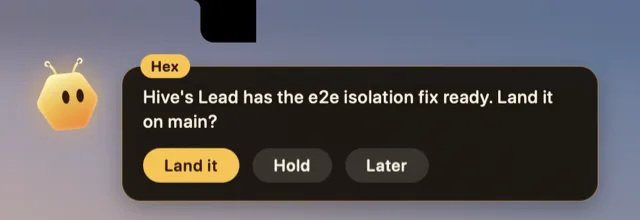
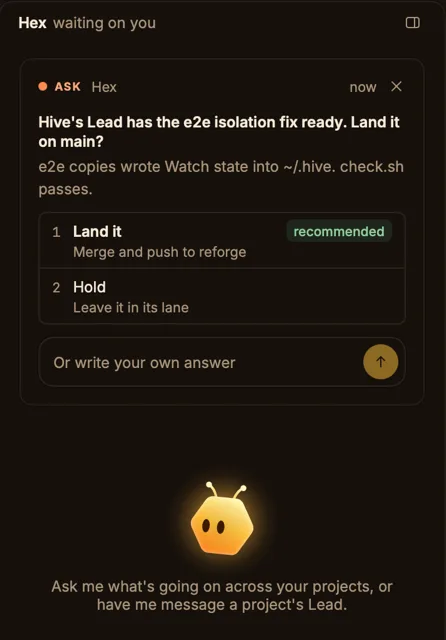
Hex is the orchestrator, with a face. They live beside the notch, in Hive, or both: you choose on the first run. Their asks come with the answers inside, so one click lands a lane or holds it.

The hive command
# threads, on any machine
hive threads [--project p]
hive thread start --project <p> [--on local|auto|<machine>] --prompt <text>
hive thread send <id> <text> [--wait secs]
hive thread read <id> [--last n]
hive thread allow <id> | deny <id> --why <text>

# machines and the queue
hive machines
hive queue add --project <p> --prompt <text> [--after-lane name] [--at time]
hive queue list

# this machine
hive node serve
hive update
Each takes --json. On a Mac it comes inside the app; on Linux and Windows it's
the node that runs threads for it. hive help has the rest.
Get Hive
Not out yet.
Hive is a GitHub Next prototype. When it ships, it's here.
- macOS
- 14 Sonoma or later, Apple Silicon: the app, with the
hivecommand inside - Linux
- x86_64 or arm64, with systemd: the node and the command
- Windows
- 10 or 11, x64: the node and the command
- Agents
- Claude Code, Codex or Copilot CLI, installed
Made by
- Made at
- GitHub Next
- Built with
- Go and MyGo; terminals by Ghostty's libghostty-vt
- Agents
- Claude Code, Codex and Copilot CLI, each an extension you can turn off
- Set in
- Mona Sans